Convert Support & Sales Conversations into High‑Intent Blog Topics

Most teams drown in keyword spreadsheets and still miss the questions prospects actually ask right before they buy. I’ve been there. At Proposify, we ranked for all sorts of terms, but some of the best traffic didn’t turn into pipeline because the topics sat too far from the point of sale. Great content; weak demand signal.
Here’s the shift. Your highest-intent topics are hiding in plain sight—in support tickets and sales calls. The stuff that makes people nervous, slows migrations, or confuses procurement. Pull that phrasing into your topic workflow and you’ll publish fewer pieces that “do numbers” and more that move deals.
Key Takeaways:
- Treat support and sales conversations as your highest-intent topic source
- Normalize messy transcripts into a simple taxonomy before scoring
- Separate “operational” (bugs, outages) from “commercial” (objections, migrations)
- Quantify the cost of ignoring conversation-derived topics to build urgency
- Ship a lightweight pipeline in 30 days: inventory, normalize, extract, score, brief, test
- Measure early signals (CTA CTR, demo requests, deflected tickets) and iterate
- Use Oleno to operationalize a validated backlog into daily, on-voice publishing
Your Highest-Intent Topics Are Hiding In Support And Sales
The most valuable topics come from conversations, not keyword tools, because they reveal exact objections and late-stage anxieties. These questions carry purchase intent, budget context, and urgency that head terms rarely show. Think “how to migrate without downtime” or “what happens to permissions on deprovision” on a trial call.

Why keyword tools miss late-stage purchase intent
Search tools optimize for volume and competition, so your roadmap tilts toward awareness content. That’s fine for reach, less useful for revenue. The phrases that signal budget, timeline, and technical ownership are tucked inside chat logs, ticket threads, and call transcripts. They’re precise, and they point directly to conversion friction.
When I was running content as a solo marketer at PostBeyond, I could produce volume and quality, but even then I relied on structured prompts more than real phrasing. The delta showed up in sales calls. Reps kept hearing the same nuanced concerns that our high-ranking posts didn’t address. That’s the gap. Mining how buyers actually ask questions closes it.
A simple prompt won’t fix this. You need to treat conversation sources as a first-class input. Then topics shift from “best practices for X” to “how to switch from Tool A without losing historical data.” One drives views. The other drives demos.
What is conversation mining and why now?
Conversation mining is collecting, cleaning, and labeling questions from support tickets, chat, calls, NPS, and forums, then normalizing them into an action-ready topic backlog. The point isn’t to replace strategy. It’s to upgrade your inputs so strategy reflects what buyers actually say when stakes are high and timelines are real.
The reason this works now is practical: affordable transcription, simple storage, and accessible NLP make a production pass possible in days, not quarters. You can pull a 60–90 day sample, strip fillers, map to a taxonomy, and start scoring. Keep the process lightweight and repeatable. That’s the key. One more thing—treat raw phrasing as sacred. Don’t over-summarize it away.
If you want more angles for sourcing beyond volume-driven tools, there’s a thoughtful take on alternative ideation in Grow and Convert’s content ideation guide. The thread is the same: start from customer language, not generic topics.
Who benefits most from this pipeline?
This approach favors teams with strong products, active support queues, and lots of sales conversations—but thin pipeline from content. If you’re publishing regularly and still hearing “content isn’t helping” from sales, start here. You’ll prioritize conversion-adjacent topics over calendar filler.
Lean teams benefit doubly. You can’t out-publish competitors, so you out-precision them. Cover the question that sits between a trial and a demo. Write the piece that a rep can drop mid-call to unstick a migration anxiety. Support wins too: fewer repetitive tickets because answers exist, and they’re findable.
And if you’re running live chat, that’s a goldmine. Conversion lifts from chat aren’t exactly new; several studies capture the relationship between chat and intent, summarized here: 7 studies show live chat correlates with higher conversion rates. Treat that stream as prioritized input.
Ready to put this motion on rails without babysitting drafts? You can Request a demo and see what autonomous, on-voice publishing feels like in practice.
The Real Bottleneck Is Signal Capture, Not Ideation Volume
The obstacle isn’t idea scarcity; it’s signal capture. Traditional planning leans on tool-visible data, while high-intent phrasing lives in messy transcripts. Normalize that language into a shared taxonomy and you can sort, score, and ship topics that repeatedly address late-stage friction.

What traditional planning misses
Editorial plans often reflect what’s easy to see. Keyword tools hand you head terms. Sales decks codify your pitch, not your buyer’s objections. Support tags route tickets quickly, but the categories are rarely designed for content planning. The result is clean spreadsheets and weak conversion alignment.
The move is upstream. Capture exact phrasing from conversations and normalize it. Build a simple taxonomy that content can use repeatedly—product area, persona, lifecycle stage, friction type. Once you can label “migrate from X without downtime” versus “pricing page confusion,” prioritization becomes boring in the best way.
If you need a nudge on research beyond keywords, this breakdown on sources and workflow is useful: how to do content research for blog posts. The point isn’t novelty. It’s consistency.
The hidden complexity inside transcripts
Transcripts are noisy. Filler words, speaker overlaps, half-finished thoughts, acronyms that only your SEs know. A naive keyword scan will surface “migration” a hundred times and still miss the real concern: permissions mapping on service accounts during cutover.
Run a light normalization pass. Remove fillers and timestamps. Standardize product names. Map acronyms. Then dedupe recurring threads. The goal isn’t heavy engineering; it’s turning chaos into a spreadsheet you can sort. Shared taxonomy in, cleaner signal out.
Once you can trust the tags, downstream scoring becomes reliable. You can separate “export data safely” (buying signal) from “export button broken” (operational fix). It sounds basic. It’s not. It’s where most teams slip.
How do you separate bugs from buying signals?
Treat operational and commercial threads differently from the start. Bugs, outages, and one-off misconfigurations are operational. They inform docs and release notes. Keep them off your blog backlog. Persistent objections, migration fears, and procurement hurdles are commercial. That’s your high-intent content queue.
Create two labels during preprocessing: “operational” and “commercial.” Commercial signals get scored and prioritized; operational signals route to docs and status updates. Your plan becomes clearer, support gets relief, and content avoids becoming a customer care channel in long-form.
If you want language for making this distinction measurable, here’s another angle on mapping phrasing to demand: finding topics your clients actually search for. Different path, same destination—clarity.
The Costs Piling Up When You Ignore Conversational Intent
Ignoring conversation-derived topics taxes your funnel, team time, and sanity. You get more posts, fewer qualified actions, and a mounting backlog of rework. Quantifying the gap—leads, hours, and missed opportunities—creates the urgency to fix it this quarter, not next year.
The funnel leak math, a quick model
Let’s pretend you publish eight posts a month. Average 1,500 visits each. One percent CTA click, five percent form complete. That’s six leads. Not great, not terrible. Just average.
Now, say two of those posts come straight from conversation phrasing—addressing migration risk head-on—and they lift CTA clicks to three percent and forms to seven percent. Those two posts alone add roughly six leads. Same volume, fewer misses. That’s the compounding effect of precision.
Could your actual lift be lower? Sure. But even modest improvements matter at scale. You’re shifting the curve with better inputs, not more output.
Rework and content waste that does not convert
Low-intent posts consume edit hours, design cycles, and still miss. You end up with frustrating rework, followed by a “refresh” six weeks later to add intent you didn’t capture in the first place. If the source was wrong, polish won’t save it.
Capturing the right questions upstream reduces churn. Editors spend less time rescuing drafts. Designers aren’t stuck reflowing layouts on underperformers. Writers focus on assets that sales actually uses in live deals. Less waste across the chain.
There’s also an opportunity cost. Every hour cleaning up a weak piece is an hour not spent on an objection-killer article that a rep could drop mid-call.
The downstream hit to support and sales enablement
Every unanswered objection becomes a ticket or a stalled opportunity. When content anticipates the tough questions, support deflects repeats, and sales shortens calls. Reps trust the link because it reflects how prospects actually talk.
Want ideas on measuring lift so this isn’t abstract? The pattern shows up in case studies that tie targeted messaging to conversion improvements, like these CRO case studies from Unbounce. Also, outlining clear conversion-oriented briefs helps—see creating content that converts sales for practical components.
If you’re tired of wrangling drafts that still don’t help sales, there’s a simpler path. Move the work from ad hoc drafting to a system. When you’re ready, try using an autonomous content engine for always-on publishing. It’s a different way to spend your time.
The Pain Of Writing What No One Asked For
Writing what no one asked for feels productive until it isn’t. You hit publish, numbers look fine, and yet sales still can’t use it. The fix is small: make every great question reusable. Turn it into a brief. Ship it. Listen for the echo on calls.
When your best prospect question dies in the queue
We’ve all seen it. A sharp trial question lands in Zendesk. Someone writes a thoughtful answer. Then… it disappears into the ticket archive. Two days later, a rep gets the same question and scrambles to re-type the gist over Slack at 6:15 p.m.
Multiply by twenty and you’ve got a pattern. The cure is an intake loop. Flag high-value threads, add them to a backlog, and brief them quickly. It doesn’t need to be fancy. A shared form and a weekly triage meeting is enough to start.
Break the habit of “answer once, move on.” Make the good answers durable. That’s how you scale expertise without scaling people.
The 3am incident no one saw coming
You wake to a production issue. Triage. Patch ships. Support gets hammered with variations of the same fear-laced question. Product posts an update, but content has nothing buyers can use to navigate the fallout. The pain isn’t just the incident. It’s the silence after.
When incidents become “what to check” articles and FAQs, worried-about calls drop. Customers feel guided, not left guessing. This is less about PR, more about empathy. Answer what they’re actually asking, in their words, and you reduce anxiety-driven escalations.
Will every incident warrant a blog post? No. But the patterns do. Capture them once and reuse them next time.
What changes when content finally lands for buyers?
Call time drops. Prospects self-qualify faster. Support points customers to answers instead of rewriting them. You start hearing reps say, “Send the migration piece,” and customers reply, “That explained exactly what we needed.”
Small wins add up: cleaner handoffs, tighter discovery, clearer evaluation criteria. The compound effect shows up over quarters, not days. But you’ll feel it quickly—fewer fire drills, more confident conversations.
Perspective shift: content stops being a marketing artifact and becomes a sales and support tool. That’s the job.
A Practical Pipeline You Can Ship This Month
You can stand this up in 30 days. Inventory your conversation sources, normalize the text, extract entities and intent, score topics, brief quickly, and validate with small tests. Lightweight beats perfect. The goal is a repeatable loop, not a hero project.
Inventory conversation sources
Pull a 60–90 day sample from five feeds: support tickets, chat transcripts, sales call recordings, NPS comments, and forum threads. Export with timestamps and any existing tags. Keep raw phrasing; don’t over-summarize it away. If privacy risk exists, redact identifiers and store data in an access-controlled folder your team can query.
Aim for a representative slice across segments and deal stages. Enterprise trials feel different from self-serve signups. Include both. And don’t forget pre-sales chat. That’s where deadline pressure leaks out most clearly.
If you want more ways to mine ideas from buyer pain, revisit Grow and Convert’s content ideation article. It complements this pipeline nicely by keeping you anchored to real problems. Interjection. Don’t confuse inspiration with input quality.
Also, live chat is a high-intent surface. The summary here is useful context: live chat studies and conversion correlation.
Normalize and map the text
Transcribe calls if needed. Remove filler words and timestamps. Standardize product and competitor names. Map acronyms. Then deduplicate recurring threads so you aren’t counting the same question ten times. This is a cleanup pass, not a ML science project.
Create a simple taxonomy with four dimensions: product area, persona, lifecycle stage, and friction type. A spreadsheet is enough. Consistency beats complexity. Once you can filter “security admin, late-stage, migration risk,” the backlog becomes sortable in minutes.
If you want a practical walkthrough of research sources and steps, this guide on how to do content research for blog posts is worth a read. Apply it to your normalized dataset and you’re ahead.
Extract entities and intent signals
Run a pass to pull entities like features, integrations, and competitor names. Tag questions versus statements. Label funnel stage heuristically based on phrasing. “How do I migrate from X?” is mid-to-bottom. “What’s the difference between Y and Z?” reads like evaluation.
You can do the first batch manually to set the standard. Then script a lightweight NER and question classifier. Keep precision high initially—false positives erode trust. Once the team sees consistent tags, you can expand coverage.
Need more on mapping phrasing to search behavior? This breakdown on finding topics prospects actually search for aligns well.
Build an intent-scoring model
Combine three factors into a 0–100 score: frequency in the last 90 days, conversion proximity, and commercial relevance. As a starting point, weight it 40 percent frequency, 35 percent conversion proximity, 25 percent commercial relevance. Review the top 20 and adjust thresholds after a small pilot.
The point isn’t perfection; it’s repeatability. You want a boring, defensible way to sort topics so next month’s prioritization looks a lot like this month’s—minus what you shipped.
For brief components that align content to conversions, skim this piece on optimizing content for conversion points. It’ll help you connect scoring to action.
Prioritize and brief quickly
Plot topics on a simple matrix: impact versus effort. Pick five quick wins and two strategic bets. Write a one-page brief per topic: problem framing, target persona, must-include entities, internal link targets, and a CTA that matches the stage. Lock a consistent H2/H3 scaffold so drafts don’t drift.
Briefs are where speed comes from. When structure is pre-decided, writers spend their time on argument and clarity, not outline debates. You’ll also reduce the “structure edit” loop that eats hours later.
If you want practical guidance on brief elements that drive action, see creating content that converts sales. Adapt it to your taxonomy.
Validate with lightweight tests
Ship micro-articles, FAQ snippets, and demo-supporting posts. Don’t wait for a 2,500-word opus to validate a question. Watch leading indicators: CTR on the CTA, demo requests, and support deflection rate. If a topic moves one of those early, invest in the full narrative. If it flatlines, learn and pivot.
You’re building a learning loop. That’s the point. For ideas on measuring lift, browse CRO case studies that highlight incremental wins. Steal what fits your stack and move on.
How Oleno Operationalizes Your Validated Topic Backlog
Oleno turns a validated backlog into daily, on-voice publishing without prompts, handoffs, or manual QA. It discovers topics from your sitemap and knowledge base, enforces differentiation up front, writes in your voice, applies a quality gate, generates visuals, and publishes to your CMS on a set cadence.
Topic discovery from your sitemap and knowledge base
Once you turn conversation insights into internal docs and FAQs, add them to your knowledge base. Oleno analyzes your sitemap and knowledge base to determine what content should exist, detects gaps and overlap, and schedules topics to your daily quota. You don’t manage keyword lists or editorial calendars; the system does.
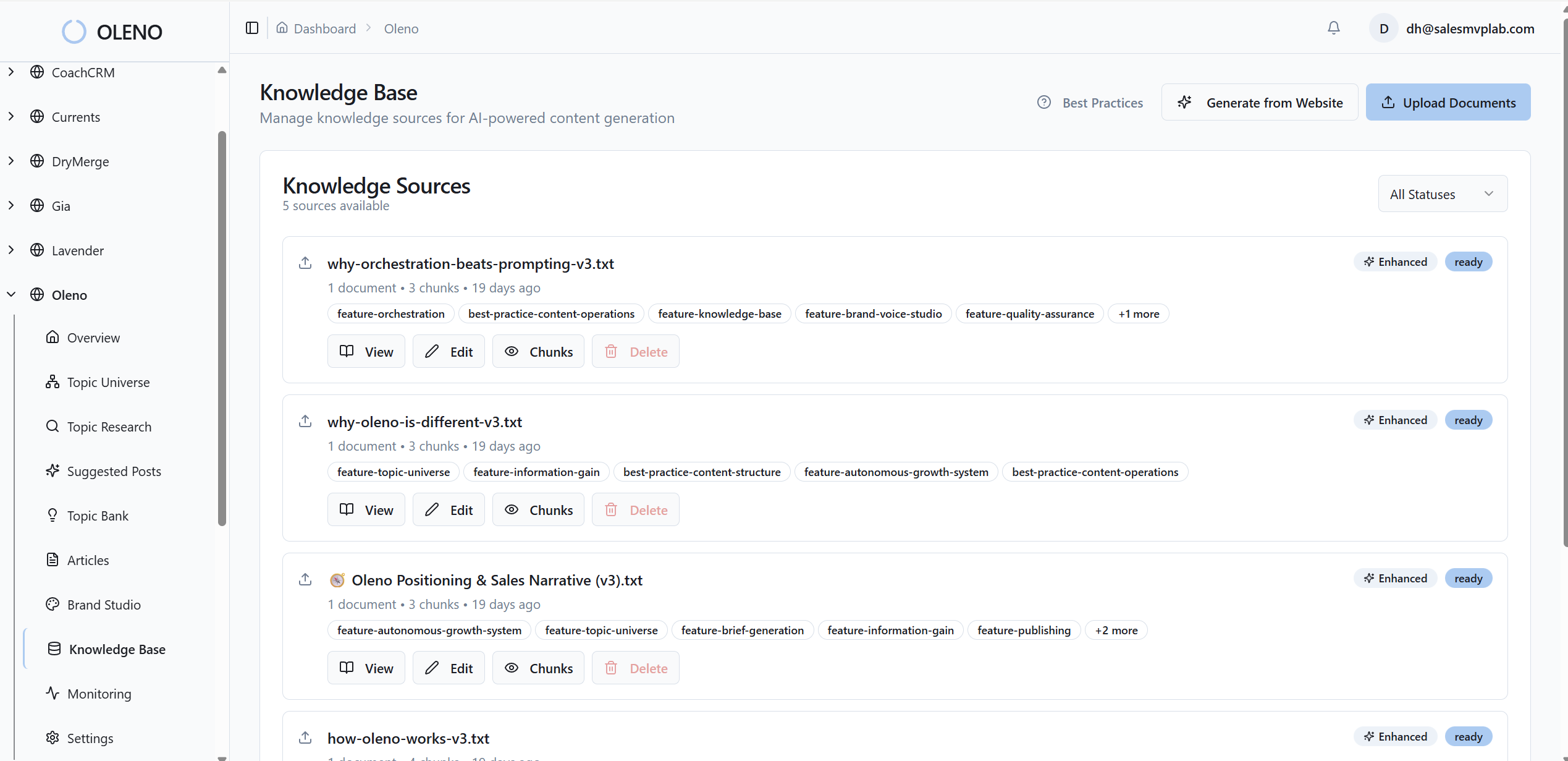
This is how high-intent themes stay visible and duplicative or thin posts get blocked before they waste anyone’s time. It’s pragmatic. Inputs improve, outputs follow.
Angle and brief generation that enforces information gain
For each selected topic, Oleno creates a differentiated angle and locks a brief before any drafting begins. The brief defines H2/H3 structure, target terminology, internal link targets, and CTA placement. Weak or generic topics are blocked upfront, so you’re not rescuing sameness in edits later.
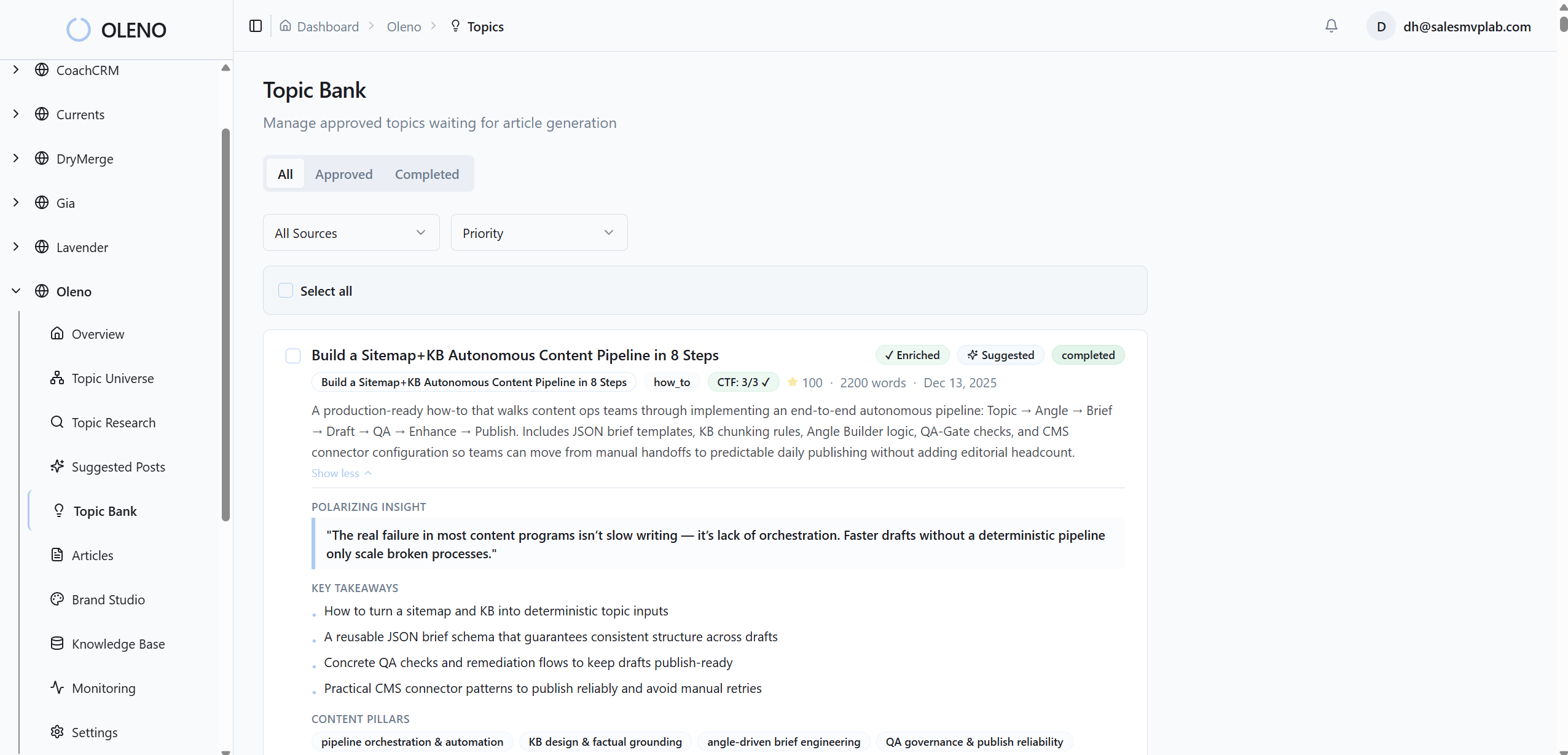
That ties directly back to the rework pain. Structure fights drift. Differentiation fights redundancy. Your editors get their evenings back.
QA gate and deterministic publishing to remove rework
Oleno writes the full article in your defined brand voice and grounds claims in your knowledge base. Every piece passes through a QA gate that checks narrative structure, clarity, SEO/LLM formatting, and KB grounding. Articles below threshold are revised automatically until they pass.
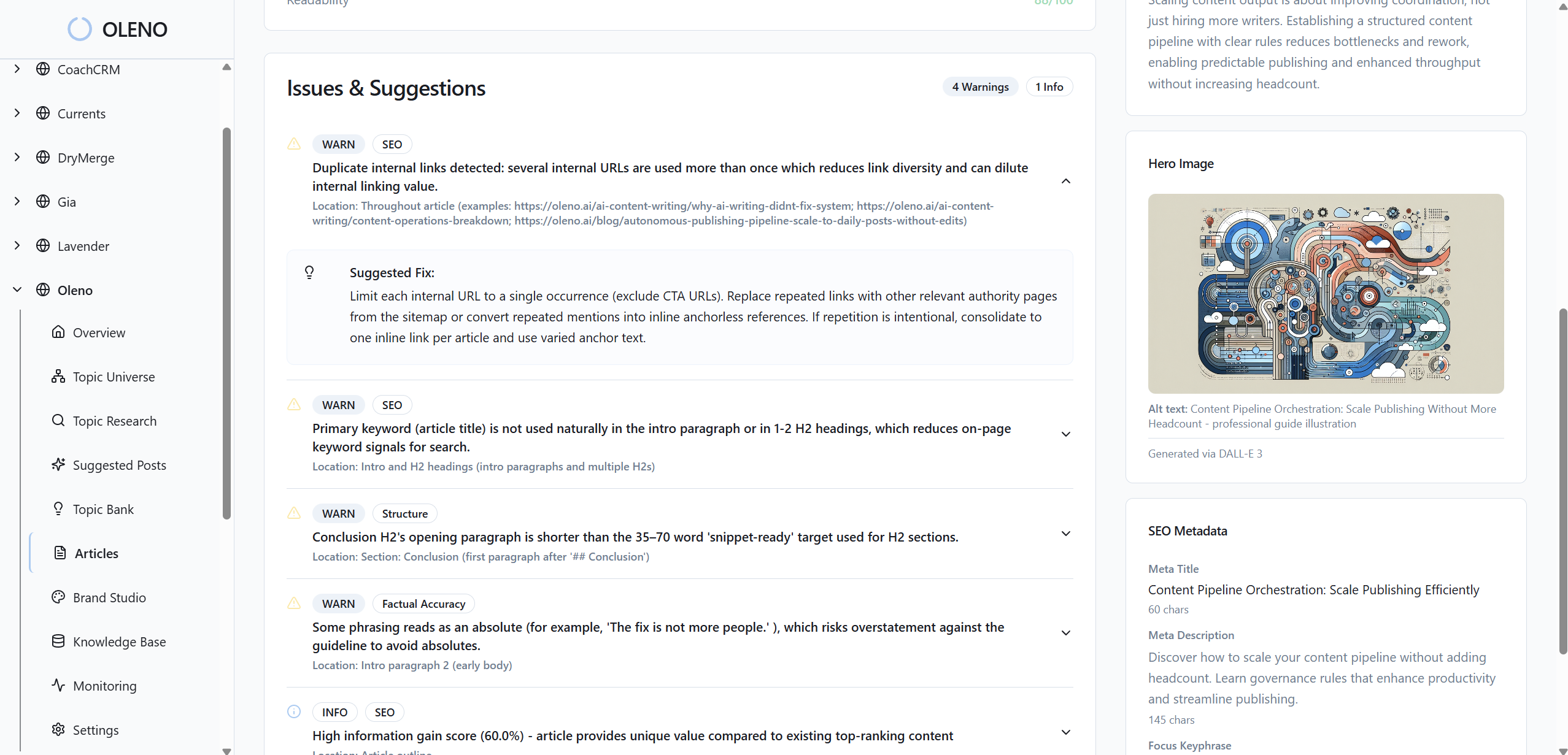
When content clears QA, Oleno publishes directly to your CMS—WordPress, Webflow, Storyblok, HubSpot, Framer, and more—on a fixed cadence. No copy-paste, no formatting, no manual upload. That predictability reduces frustrating rework and the “who’s publishing this?” shuffle.
Visuals and Social Studio to extend each article
Oleno generates brand-consistent hero images and optional inline visuals with SEO-safe filenames and alt text, treated as part of the article—not an afterthought. After publish, Social Studio creates platform-specific social post drafts (multiple variants) you can copy and post. It doesn’t schedule or measure. It simply extends creation so sales and support have reusable assets.
If you’ve been trying to connect articles to conversion moments, this overview on aligning content to conversion points pairs well with how Oleno structures CTAs. For brief-level CTA planning, revisit creating content that converts sales.
Here’s the bottom line. You’ve got the signals. Oleno runs the system: discovery to publish, consistently. If you’re ready to stop coordinating drafts and start publishing on a reliable cadence, Request a demo now.
Conclusion
You don’t need more topics. You need better inputs and a system that ships. Mine support and sales conversations for late-stage phrasing, normalize it into a usable taxonomy, and validate quickly. Then let Oleno run the boring parts—angles, briefs, QA, visuals, and publishing—so your team focuses on the story, not the spreadsheet.
About Daniel Hebert
I'm the founder of Oleno, SalesMVP Lab, and yourLumira. Been working in B2B SaaS in both sales and marketing leadership for 13+ years. I specialize in building revenue engines from the ground up. Over the years, I've codified writing frameworks, which are now powering Oleno.
Frequently Asked Questions