How to Generate SEO-Friendly, Brand-Consistent Images at Scale

We’ve all shipped a post with a pretty hero image that did absolutely nothing. I’ve been there. You stare at it and think, nice. Then you realize the filename is “final-final-hero.jpg,” the alt text is blank, and the colors are slightly off from your brand. Annoying. Also fixable.
Here’s the real pattern: when visuals show up at the end, they drift. They don’t carry the story. They don’t help search. They don’t reinforce trust. You need visuals treated like product—defined, governed, versioned, and placed with intent. Not “make it pop.” Make it work.
Key Takeaways:
- Treat visuals as a governed system, not a last-minute add-on
- Codify brand tokens so templates can generate on-brand images automatically
- Bake SEO into the image pipeline: filenames, alt text, captions, placement
- Replace handoffs with deterministic rules and QA gates to cut rework
- Prioritize product visuals in decision moments to support conversion
Ready to skip the theory? See the approach in action and Try Using An Autonomous Content Engine For Always-On Publishing.
Why Your Images Look Generic And Hurt Trust
Most images look generic because they’re added after writing, without rules or context. Search engines want descriptive metadata and consistent placement patterns to understand visuals. Teams that codify brand tokens and image roles see better recall and cleaner SERP presence—for example, consistent heroes plus screenshot proof in solution sections.

Most teams bolt visuals on at the end
When images arrive after the draft ships, they’re decorative. Not strategic. You end up with off-brand color tints, inconsistent logo usage, and screenshots that don’t match the section’s claim. Readers skim past them because they don’t add meaning. Search engines do the same. There’s no connective tissue.
The fix isn’t “better taste.” It’s upstream planning and downstream rules. Decide which sections require visuals. Define the roles: hero, inline explainer, product screenshot, thumbnail. Tie each role to a purpose. Then make generation and placement part of the pipeline, not an optional to-do sitting on someone’s desk.
I’ve seen teams improve trust simply by aligning the first inline visual with the core “why” in the first section. It signals “we did the thinking.” You don’t need more images. You need the right ones, placed deterministically.
What does brand-consistent mean in practice?
Brand-consistent means tokens, not vibes. Hex values for colors. Approved logo lockups with safe zones. A type scale that defines headline and caption weights. Motifs you do use (soft gradients, geometric shapes) and “never use” examples (heavy drop shadows, meme screenshots). That’s the foundation.
When those tokens live in a Brand Asset Library, your templates can consume them without a designer in every loop. The result is repeatable quality. The same hero structure, the same overlay constraints, the same max text length, every time. It’s boring in the right ways and recognizable where it counts.
This also reduces well-meaning improvisation. Writers stop hunting for stock images. Designers stop policing hex codes. Editors stop fixing logo placement. The system enforces the basics so the team can spend attention on the story.
Why “pretty” images underperform in search
Search needs context, not just aesthetics. Without descriptive filenames, concise alt text, and captions that align to the paragraph’s claim, even gorgeous images are invisible. Placement matters too. Crawlers look for patterns that map visuals to meaning.
Start by baking metadata into the image pipeline. Filenames should reflect topic and role. Alt text should describe the image, not the entire article. Captions should add one specific point. Follow Google’s image SEO guidelines for the basics. For practical day-to-day execution, the patterns from Yoast’s image SEO recommendations are helpful.
The Real Bottleneck Is A Missing Visual System
The bottleneck isn’t designers or image tools. It’s the lack of a machine-readable visual system that production can query. When brand tokens, templates, and placement rules become code, visuals scale at the same cadence—and quality—as text. A simple example: one hero, two inline visuals, and a prioritized product screenshot per article.

What traditional approaches miss
Most teams have a PDF brand guide and a folder of assets. Useful references, sure, but not production-ready. A PDF can’t generate a hero header. A folder doesn’t know which screenshot belongs in the solution section. So every image becomes a custom job. Slow. Inconsistent.
What you need is a library that the system can read. Colors as variables. Logo lockups with defined safe zones. Screenshot assets tagged by feature keywords. Templates that pull those tokens and output predictable results. That’s when “on-brand” becomes an input, not a subjective review cycle.
Once the library exists, it unlocks downstream automation. You can render heroes in multiple aspect ratios. You can enforce overlay text limits. You can generate alt text from section context. The peripheral fixes disappear because the rules do the work.
How visuals become content infrastructure
Turn tokens into inputs, templates into functions, and rules into code. Your brief defines image roles per section. The pipeline renders hero and inline variants, generates filenames and alt text, and places assets deterministically. Each step is explainable and repeatable.
This approach removes the guesswork. The same section type always gets the same visual role. Product sections receive tagged screenshots. The SEO bits—captions, alt text, filenames—ship with the image, not as a separate task. Over time, the system compounds. Quality stops relying on “who had time this week.”
You’ll still make creative choices for campaigns and reports. But the baseline? It’s handled. No more “final-final-2.png” or captions that restate the headline. The infrastructure enforces the fundamentals, so the team can focus on insight.
Where do traditional processes break?
They break at handoffs. Writers wait on designers. Designers wait on approvals. Later, someone in SEO sweeps through to fix filenames and alt text. Everyone’s doing their job. The workflow is the problem. Each handoff introduces delay and drift.
Replace handoffs with upstream rules and downstream QA gates. Define which sections require visuals. Automate generation. Validate before publish. Fewer loops, fewer edits. If you want a deeper view on programmatic delivery and metadata, the Imgix best practices for improving SEO traffic align with this systems-first approach.
In my experience, when teams remove just one manual handoff—the “designer please make a hero” request—turnaround time drops and consistency rises. It’s unglamorous. It works.
The Costs You Do Not See When Images Are Ad Hoc
Ad hoc visuals look cheap, but they’re expensive. You burn hours fixing tiny things, ship inconsistent signals to buyers, and pay a performance tax in page speed and rankings. A small ruleset—tokens, templates, placement, QA—reduces all three costs without adding headcount or tools.
How much time do manual checks really cost?
Let’s pretend you spend 25 minutes per article fixing filenames, alt text, and placement. At 40 articles a month, that’s 16.5 hours of rework. Add the review loop and you double it. Two workdays gone, every month, to chase details the system could handle.
Multiply that across a year and you’re paying for a part-time role that doesn’t create new content. You’re just fixing it. That trade might be fine once or twice. At scale, it’s a tax. Automate the rules once and redeploy that time to research, interviews, or product storytelling.
And yes, some editorial oversight remains. But “oversight” should be a quick check, not a cleanup shift.
The credibility penalty in sales conversations
Buyers notice drift, even if they don’t call it out. Old logo in a hero. Outdated screenshot. Inconsistent color. It creates a subtle trust gap. If this detail is off, what else is? Sales teams feel it when they share content that doesn’t match the product you’re demoing.
Solve with simple mechanics: versioned product screenshots, semantic tags for features, and placement rules that prioritize solution sections. The right screenshot meets the right claim at the right moment. You reduce that uncomfortable “hang on, it looks different now” moment that derails momentum.
Brand consistency doesn’t win the deal alone. But inconsistency introduces friction. Remove it.
Performance waste that undermines rankings
Big, unoptimized images with no responsive variants and no lazy loading slow pages down. Slow pages hurt rankings and conversions. Formats like WebP or AVIF help, but structure matters too. Good filenames and alt text clarify meaning; predictable placement reinforces it.
Google’s guidance emphasizes both performance and discoverability for images. Follow the basics—compression, sizing, and responsive delivery—then pair them with structured metadata and consistent placement. If you need a refresher on compression and responsive workflows, the overview from Imagify is solid, but we won’t link it twice here to avoid redundancy.
Still fixing alt text by hand and renaming files at publish time? You’re not alone. You also don’t have to keep doing it. Take one afternoon to codify the rules, then Try Generating 3 Free Test Articles Now.
The Frustration Of Rework And Brand Drift
Rework feels small in the moment and massive over a quarter. It shows up as late edits, “one more tweak” threads, and content that looks slightly different each time. A rules-first workflow turns those daily frictions into non-events. People stop worrying about basics and focus on story.
When a customer notices the mismatch
You share a post on a live call. The hero uses an old logo. The inline graphic shows last year’s UI. You feel it. They do too. It’s not catastrophic, but it injects doubt. Small mismatches create big second thoughts.
Tag screenshots by feature and maintain version history. When the “Analytics Dashboard” updates, you update one source of truth and the system places the right screenshot in the next publish. No detective work. No Slack threads. Just the right image in the right place.
Consistency doesn’t eliminate questions. It eliminates avoidable distractions.
Why designers become the bottleneck
Designers are protecting the brand. They say yes to everything, then become a queue for repeatable requests. It’s not their highest and best use. Every “can you make a hero?” pulls attention from campaigns, product launches, and new motifs.
Templates plus tokens handle most needs. Designers still own the motifs and edge cases, but 80 percent of image work becomes programmatic. That shift gives them back time and gives you speed without sacrificing standards. If you want step-by-step ways to reduce the bottleneck, the patterns in Promodo’s guidance on unique, SEO-friendly images support this direction.
The point isn’t to cut design out. It’s to stop wasting their time on resize-and-police tasks.
How do you keep creativity without chaos?
Lock the rails, not the fun. Governance sets tokens, templates, and placement rules. Inside those rails, you can vary motifs, backgrounds, and copy overlays. The creative choices happen where they add value, not where they create drift.
The best guideline I’ve used: constrain what the user or crawler depends on, explore where they don’t. Color, logo, type scale, and placement are constraints. Illustration style or background texture is exploration. That balance keeps brand intact and gives your team room to make the work feel alive.
When constraints are code, not PDFs, creativity scales safely.
A Production Workflow For SEO-Friendly, On-Brand Images
A reliable workflow aligns four pieces: tokens, templates, generation, and placement. You define brand tokens once, build reusable templates, automate generation with SEO metadata, and place assets deterministically. For example, a hero after the title, the first inline image before the first H2, and product screenshots in solution sections.
Define visual tokens you can govern
Start with a machine-readable Brand Asset Library. Include color palettes with hex values, logo lockups with safe zones, typography scales, style references, and “never use” patterns. Tag product screenshots by feature and version.
These tokens become non-negotiables at generation time. The system pulls them without a designer validating each output. Over time, you’ll expand tokens—like adding “light mode overlay” and “dark mode overlay”—but the core stays stable. That stability is what compounds trust.
Put simply: tokens stop debates early. The pipeline enforces them so humans can write and design where it matters.
Build reusable templates for hero, inline, and thumbnails
Design a small set of templates to cover common needs: hero 16:9, inline 4:3, thumbnail 1:1. Parameterize color, typography, logo lockup, and overlay areas. Define max text length and safe zones. Publish them as callable components.
Now the system can render variants at publish time. You get consistency without micro-managing each image. When a new campaign motif emerges, update the template once and everything downstream improves. No mass retrofits. No “which version is current?” questions.
You’ll still art-direct special reports. But the day-to-day? It runs on rails.
Automate generation and ship metadata with it
Feed tokens and section context into your generation pipeline. Render one hero and two to three inline visuals per article. Generate descriptive filenames that include the topic and image role—for example, “how-to-generate-seo-friendly-images-hero.jpg.” Create alt text and captions programmatically using the section’s claim.
Shipping metadata with the asset eliminates a common failure mode: “We’ll fix alt text later.” Later rarely happens. When filenames, alt text, and captions are generated with the image—and validated by QA—consistency becomes the default. For a practical checklist, the patterns from Yoast’s image SEO recommendations are useful to cross-check your rules.
Metadata isn’t busywork. It’s how crawlers understand your visuals.
Set deterministic placement rules inside the brief
Define placement in the brief. Hero after the title. First inline visual before the first H2 explanation. Solution sections get screenshots. Thumbnails are rendered for cards. Keep the rules stable so both readers and crawlers know what to expect.
Pair rules with fallbacks. If a section doesn’t qualify for a screenshot, choose the next best inline visual. If no product section exists, prioritize the explainer image. Determinism creates clarity; fallbacks preserve flow.
If you’re thinking “this sounds like overkill,” remember: you’re not adding steps. You’re replacing manual decisions with codified ones.
How Oleno Automates Brand-Consistent, SEO-Ready Images
Oleno turns brand tokens, templates, and placement rules into an automated visual pipeline. Visual Studio references your Brand Asset Library, generates hero and inline images, attaches SEO metadata, and places assets deterministically. A typical output includes one hero, two to three inline visuals, and product screenshots prioritized in solution sections.
Visual Studio turns tokens into on-brand images automatically
Oleno’s Visual Studio pulls your colors, logos, style references, and tagged product screenshots from a centralized Brand Asset Library. It generates brand-consistent hero and inline images using multiple aspect ratios, supporting up to 4K resolution. This replaces ad hoc stock picks for repeatable needs and keeps designers focused on high-leverage creative.

Because the inputs are governed, you avoid the familiar “these blues don’t match” conversation. Visuals look like they came from you, because they did. The system just assembles them at speed.
When you need a new motif, update the references once and everything downstream adopts it the next time you publish.
Alt text and filenames are generated with section context
Oleno generates descriptive filenames, concise alt text, and captions from the article structure. Filenames include topic and role. Alt text stays accurate and succinct. Captions add a specific point that reinforces the paragraph, not a restatement of the headline.
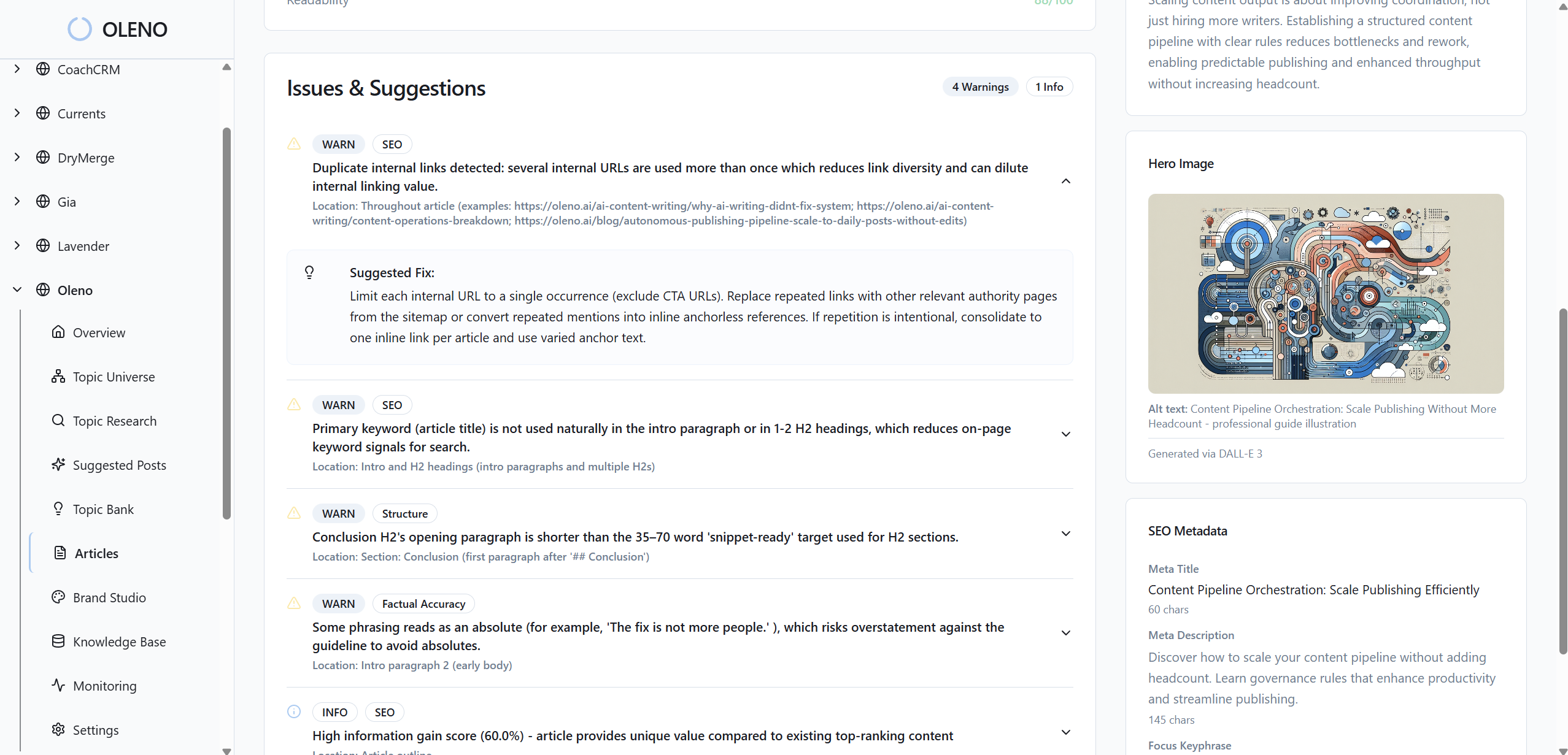
Those details are validated during Oleno’s QA gate. If they’re missing or weak, refinement runs before publish. That’s how you avoid the 25-minute cleanup loop per article and keep shipping at pace. Over time, the consistency compounds discoverability and trust.
It’s not glamorous work. It’s the work that makes everything else land.
Product screenshots are placed where they drive action
Screenshots are tagged by feature keywords and matched via semantic similarity to the most relevant section. Oleno prioritizes solution sections so readers see product proof at decision moments. Placement follows deterministic rules, which means no guessing, no hunting through folders, no “is this the latest UI?” errors.
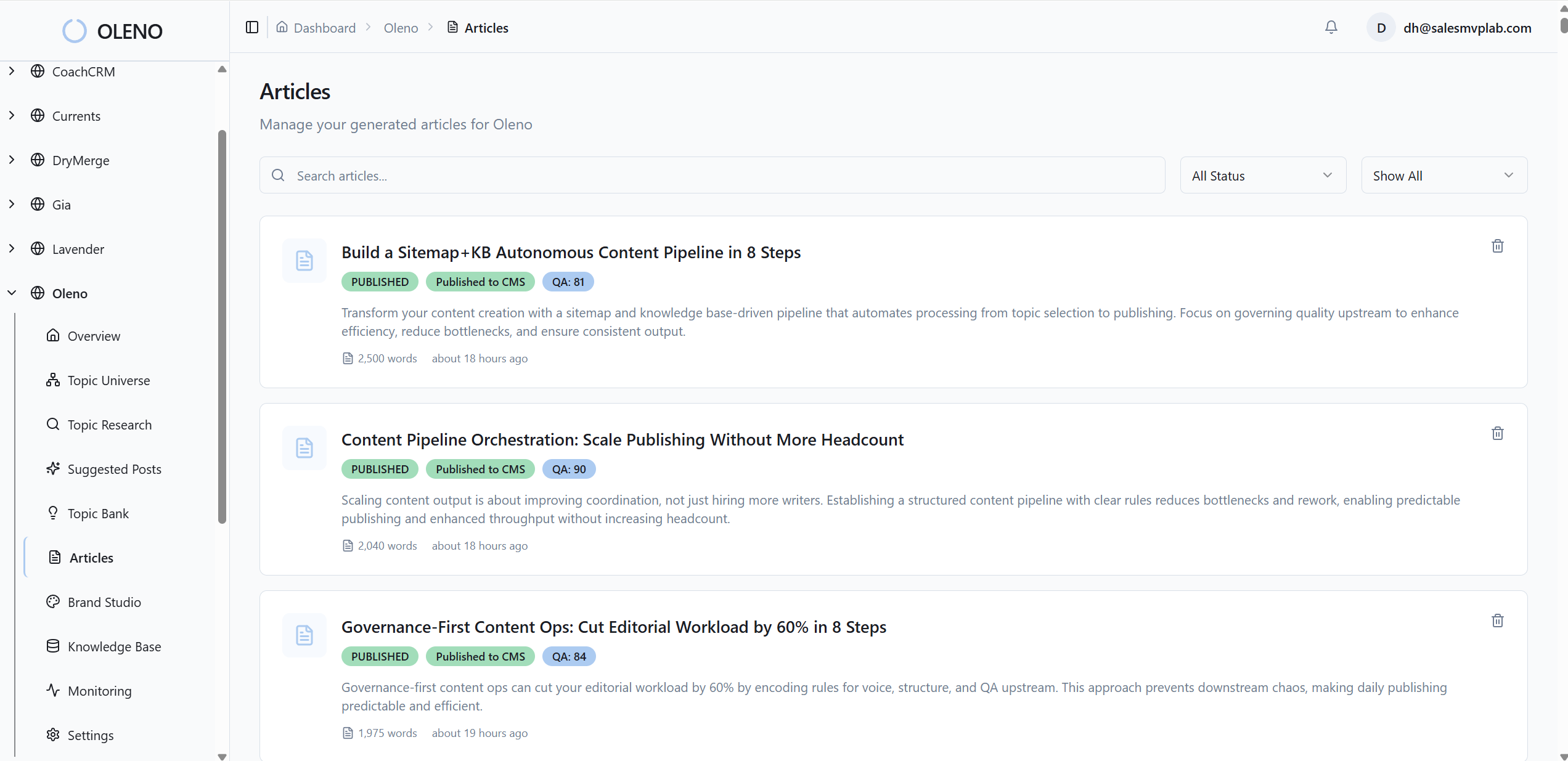
This is where credibility is built quietly. The right proof at the right moment reduces friction in both reading and sales conversations. If you’ve ever had a buyer pause because the UI looked different, you know why this matters.
You’re not flooding posts with screenshots. You’re placing them where they earn their keep.
QA and publishing ensure nothing slips through
Oleno validates visual placement, brand consistency, alt text, and filenames as part of its QA gate. Low scores trigger refinement loops. Once approved, visuals and metadata publish through CMS connectors (WordPress, Webflow, HubSpot, Google Sheets) with fields mapped correctly. No manual embedding. No last-minute drag-and-drop.
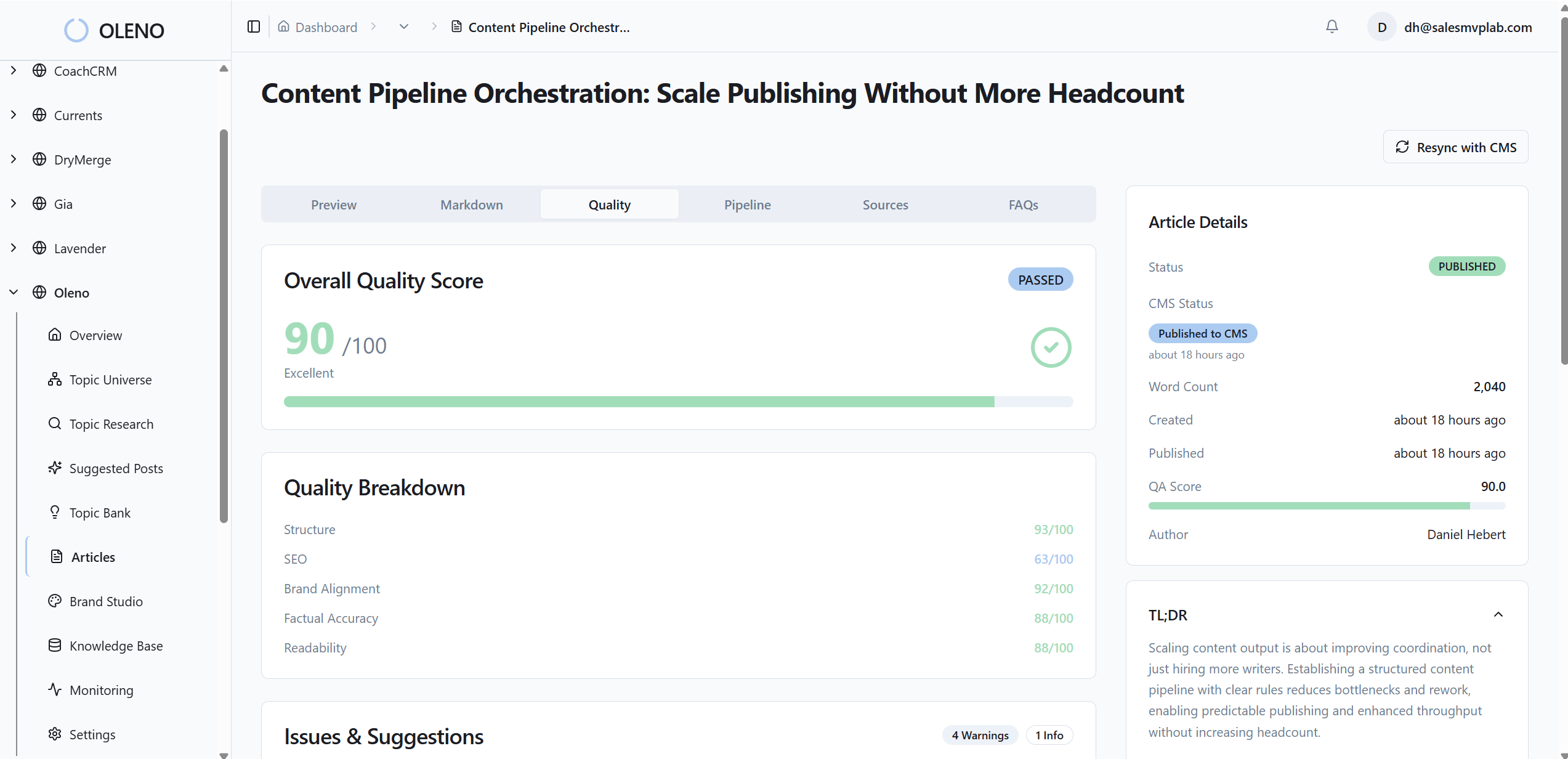
This closes the loop from rules to results. The outcome isn’t a draft with a to-do list—it’s a publish-ready article where text and visuals meet the same bar. If you want to see a token-to-template-to-publish run end to end, Try Oleno For Free.
For programmatic image delivery patterns that align with this, you can compare Oleno’s approach to the delivery principles outlined by Imgix’s SEO traffic guidance and the placement clarity in Google’s image SEO guidelines.
Conclusion
Pretty images don’t build authority. Reliable systems do. When you codify tokens, standardize templates, generate metadata with the asset, and place images deterministically, visuals stop being a chore and start doing their job: signal credibility, support the story, and earn visibility. It’s not about more images. It’s about making every image earn its place.
About Daniel Hebert
I'm the founder of Oleno, SalesMVP Lab, and yourLumira. Been working in B2B SaaS in both sales and marketing leadership for 13+ years. I specialize in building revenue engines from the ground up. Over the years, I've codified writing frameworks, which are now powering Oleno.
Frequently Asked Questions